Self-hosting and digital independence #
It was Microsoft Copilot in Office 365 that got me. Suddenly, one day, without me asking for it - it was everywhere. Getting in my way. This was a product I was paying for that was making it harder for me to do my job, unhelpful context menu entries, unasked for prompts, and more. My eyes were opened. Then Google AI search summaries that gave me the wrong information and pushed what I needed further down the page. And suddenly, my phone nagging me to use AI features I never asked for.
Enough.
I had already self-hosted a few mission critical IT applications for Civilytics Consulting. It was the right choice of cost, security, and privacy for our client mix. And we had a file server to keep our data and our customers’ data safe. What if I just… kept going? Extended those services to replace everything from big tech providers that was getting worse.
That’s what I’ve been doing over the last several years now… slowly building my way out. This page lists the pieces that I use to get this done and what has been most helpful to me in my journey. You don’t need all of this to get started, but knowing what I am using can help put the things I talk about into context.
Fleet #
The hardware.
- Maxwell — the core server. A Ryzen 7 2700X (8 cores / 16 threads), 64 GB of RAM, and a GTX 1070 Ti. It holds a 21.8 TB ZFS pool — made of two mirror vdevs of paired 12 TB enterprise drives (Seagate IronWolf + Toshiba). The OS sits on a 2 TB Solidigm NVMe. It is connected to the network via a 10-gigabit Intel X540 link. It serves about forty applications via Docker container: Immich, Gitea, Nextcloud, FreshRSS, and many more. This server builds and deploys this website.
- Euler — the AI and wide compute host. A Mac Studio (M3 Ultra): 32 cores, and a ridiculous 256 GB of unified memory, which is the whole point — it lets me run real local vision and LLM models at usable speed. It also allows me to run very long Bayesian model sampling chains, highly parallelized. Or long running machine learning pipelines forecasting student enrollment. I also edit my photos on Lightroom on this machine.
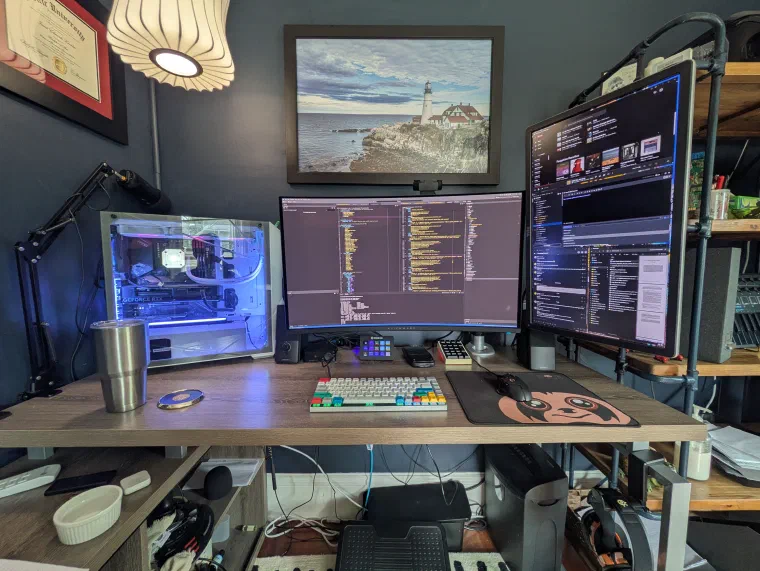
- Efron — my workstation. The RGB lit, water-cooled, glass-panel tower pictured above; my daily driver for development, writing, and gaming. An MSI MPG X570S EDGE MAX on a Ryzen 9 5900X (12 cores / 24 threads), 64 GB of RAM, an RTX 4070, and a stack of NVMe (a WD Black SN850 alongside a 2 TB Solidigm). It has its own 10-gigabit line to the server.
- Hotelling — the laptop. A Framework Laptop 13 (Ryzen 7 7840U, 96 GB RAM, 2 TB NVMe) — repairable and upgradeable by design, with a wonderful 3:2 13" display. The same environment as my workstation but works on the porch!
- Router — the network heart. A tiny, near-silent Beelink EQ (Intel N100, 16 GB, dual 2.5 GbE) running Proxmox. It hosts three critical services: the OPNsense router, Home Assistant, and the network controller.
- Remotepi — the off-site insurance. A Raspberry Pi 4 with an 18 TB drive, located thousands of miles away, receiving nightly replicated backups of Maxwell so that a local outage doesn’t take all my data with it.
OS & browser #
- Ubuntu with the KDE Plasma desktop — Linux everywhere I can. I’m new to desktop Linux as of mid-2025, but I am quite happy with the switch.
- Graphene on Android, a privacy and security focused fork of Google’s version of Android. This was very difficult to set up, but it has way less tracking and way fewer annoying pleas for attention.
- Zen — a privacy-respecting browser built on Firefox.
- SearXNG — my own self-hosted metasearch engine so the search results page stays consistent.
Network #
- I wired most of my house and home studio with 10G rated ethernet cable in 2021. I pulled the cables myself. The reward is most of my network is a wired backbone with 10G SFP+ to the file server and workstation, 2.5 gigabit PoE++ to everything else.
- OPNsense is my router and firewall, running as a VM on Proxmox . Security updates and durability were my reasons for switching, and I’ve enabled built-in Unbound ad and spyware DNS blocking for a cleaner internet experience.
- A TP-Link Omada SG3428XPP-M2 is the core switch that powers all the wired devices with 24 2.5 gigabit ports with PoE++ and four 10G SFP+ ports.
- Three Omada access points give me wall-to-wall and outdoor coverage, even with my plaster walls and aluminum siding. Two EAP223 units in the office and living room, and an EAP225-Outdoor on the porch, all powered by POE.
Storage #
- A ZFS file server. When my prior NAS died, I did some research, and ZFS had what I wanted to store and protect my massive irreplacable photo library. It is a file system that is checksummed and snapshotted, and has already been resilient to one unplanned complete restore from backup.
- Storage is accessed two ways: SMB for fast local access across the fleet, and Nextcloud for sync, sharing, and access from anywhere. If you receive a file share link from me or I ask you to send me a file - you’ll be interfacing with my Nextcloud instance running on maxwell.
- Backups are done the boring, reliable way: nightly syncoid snapshots on
tank, replicated off-site to the Raspberry Pi so there’s always a copy that a basement disaster can’t reach.
Photos #
- Immich as a full Google Photos replacement — the same auto-upload, search, and timeline, but the library lives on my hardware. (More on the photography side of this on the Photography page.)
- Lightroom is the one holdout: I still edit there because no alternative has matched it yet and I have a large legacy of file history in there. I am actively exploring how to move off of it and taking suggestions!
Notetaking #
OneNote was my day to day workflow for years. Then a Microsoft update and forced upgrade made me lose an afternoon migrating my notes and workflow to a new app. I realized this data was too critical to trust with anyone else. I’ve tried many many options, and for me this is what works:
- Joplin notes that sync across every device through my own server, stored as plain Markdown with a database I can always access. I’ve recently been exploring using the MCP server to give local agents access to contribute and retrieve relevant information too!
Messaging #
- Signal for private, end-to-end encrypted conversations.
- A self-hosted Mattermost server for the group-chat and team-coordination role including talking to my AI agents (below).
AI & local models #
The newest frontier, and the one I’m most deliberate about keeping local:
- OpenWebUI is my chat front-end for most models. I keep my chat transcripts and can seamlessly move them across model providers and API workflows.
- gemma3 vision generates the alt text for the photos on this site — running on my own hardware, connected to Lightroom by the absolutely brilliant LRGenius plugin.
- Hermes agents running qwen3 act as AI agents I can talk to directly inside Mattermost, hosted on the Mac Studio.
- Claude and Claude Code are where I reach for serious software development assistance.
This is not an exhaustive list of self-hosted tools and reaching for independence is a process, not a destination. I’m being more intentional about the technology I choose and how I engage with it, and I’m always learning more.
Are you curious how any of this is wired up, or thinking about your own escape? Email me — I love talking about this stuff.